
Build WordPress Websites With Claude and Novamira AI
AI is starting to change the way we build WordPress websites.
Not just by generating text, images, or layout ideas, but by actually helping us work directly inside WordPress.
In this tutorial, I tested a very interesting workflow using Claude Desktop, Claude Code, and Novamira AI to build complete WordPress websites with the free WordPress Site Editor. No page builder, no custom-coded theme, no complex setup. Just WordPress, Gutenberg blocks, a clean installation, and an AI agent connected to the website.
The result was honestly impressive.
In about 15 minutes, I was able to create two completely different website designs just by prompting Claude and letting Novamira make the connection between the AI agent and WordPress.

If you are interested in AI website building, vibe coding WordPress websites, or using Claude with WordPress, this is a workflow you should definitely keep an eye on.
What Is Novamira AI for WordPress?
Novamira is a WordPress plugin that allows an AI agent to interact directly with your WordPress website.
In simple words, you connect your AI client, such as Claude Desktop, to your WordPress installation through Novamira. Then, instead of manually creating every page, section, style, and layout, you can describe what you want and let the AI apply the changes inside WordPress.

This makes Novamira a very interesting tool for:
- Building WordPress websites with AI
- Creating layouts with the free WordPress Site Editor
- Working with Gutenberg blocks through an AI agent
- Testing design directions quickly
- Speeding up client website prototypes
- Exploring vibe coding workflows inside WordPress
In this video, I used the free version of Novamira to create a website using only the standard WordPress editor. The workflow was based on Claude Desktop, but Novamira can also work with other major AI clients.
The most important part is that Novamira acts as the bridge between your AI agent and your WordPress website.
Why This Workflow Feels Different
There are already many AI website builders for WordPress.
Some generate a full website from a prompt. Others create starter templates, pages, or copy. But what makes this Novamira AI WordPress workflow different is that it works directly with your existing WordPress environment.
In this test, the AI was not creating a static mockup somewhere outside WordPress. It was actually working inside the website, using the free Site Editor and standard Gutenberg blocks.
That means the final result was still editable in WordPress.
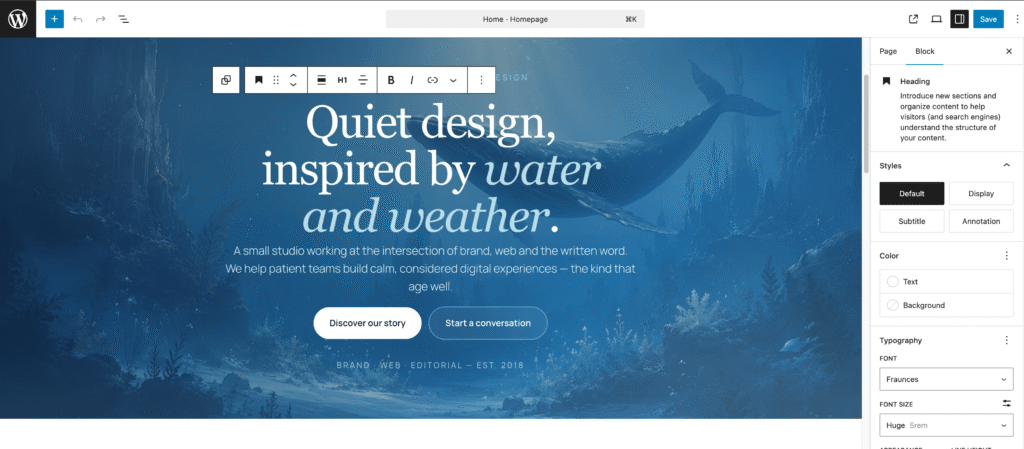
I could open the page, click “Edit,” and continue working with the native WordPress editor. I could adjust widths, change backgrounds, tweak spacing, edit text, and refine the design like any normal WordPress page.
This is very powerful because it combines two important things:
First, the speed of AI-assisted website creation.
Second, the flexibility of native WordPress editing.
If you already like working with the Site Editor, you may also enjoy my guide on how to build a blog with the free WordPress Site Editor, because this kind of workflow is becoming more and more relevant as WordPress moves toward a stronger block-based and AI-assisted future.
The Basic Setup
For this test, I started with a clean WordPress installation.
I used Hostinger and created a temporary website on a temporary domain. This is a very practical workflow because you can build and test the site without connecting it immediately to the final domain.
The basic process was:
- Create a new WordPress website
- Use a temporary domain
- Remove unnecessary default plugins
- Install the Novamira plugin
- Enable Novamira abilities
- Generate an application password
- Copy the connection prompt
- Paste the prompt into Claude Desktop
- Start giving website creation instructions to Claude
Once everything was connected, Claude was able to communicate with WordPress through Novamira and start building the website.
The important thing here is that this workflow is best suited for development and staging websites.
When you enable these abilities, an AI agent can perform powerful actions on the site, including operations that should not be exposed on a live production website without careful control.
So the safe workflow is simple:
Build on a staging or temporary website, keep backups, review everything carefully, and when the website is ready, move it to the final domain and disable or remove Novamira before shipping it to the client.
Creating a Website With Claude and the WordPress Site Editor
Once Claude Desktop was connected to WordPress, I gave it a prompt to create a professional website with three pages:
- Home
- About
- Contact
The design direction was simple: a blue main color, a nature and water-inspired atmosphere, gradients, light shadows, and a polished modern look.
I also added a set of rules to guide the AI and avoid common mistakes when working with the free WordPress Site Editor.
This is a key part of the workflow.
When you use AI agents for WordPress, the prompt matters a lot. You do not want the AI to randomly create messy HTML, unnecessary custom code, or complicated structures that are difficult to edit later.
For this kind of Gutenberg AI website builder workflow, I prefer to give clear rules such as:
- Use standard Gutenberg blocks
- Keep the structure editable in the WordPress Site Editor
- Avoid creating unnecessary templates
- Manage the main design through global styles and theme settings when possible
- Add custom CSS only where it makes sense
- Keep the website clean and maintainable
This gives the AI more freedom than a traditional template, but still keeps the result usable inside WordPress.
If you are new to building full websites in WordPress, you can also check my complete guide on how to create a WordPress website with Elementor Pro. That tutorial uses a more visual page builder workflow, while this Novamira tutorial explores a more AI-native and block-based approach.
The First Result Was Good, But Not Perfect
The first website generated by Claude and Novamira was already pretty good.
It had a clear structure, a modern layout, and a decent visual direction. For a first attempt created from a prompt, it was honestly impressive.
But it was not perfect.
Some sections needed better alignment. Some design details felt a little too basic. There were also a few small visual issues, such as double lines and spacing problems.
This is where the workflow becomes interesting.
Instead of manually fixing everything from scratch, I simply continued prompting Claude.

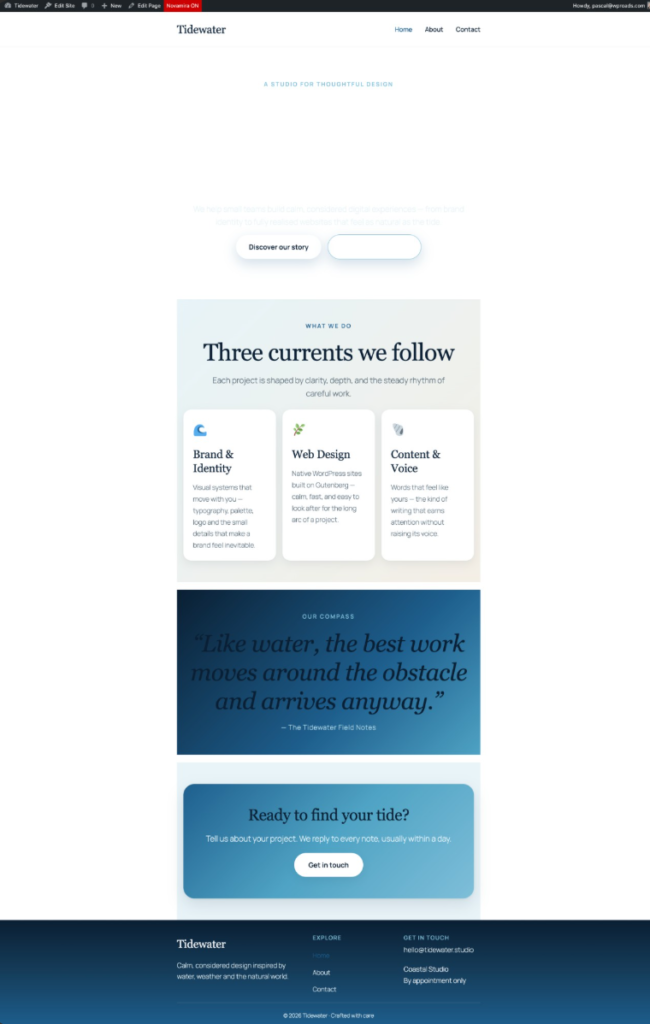
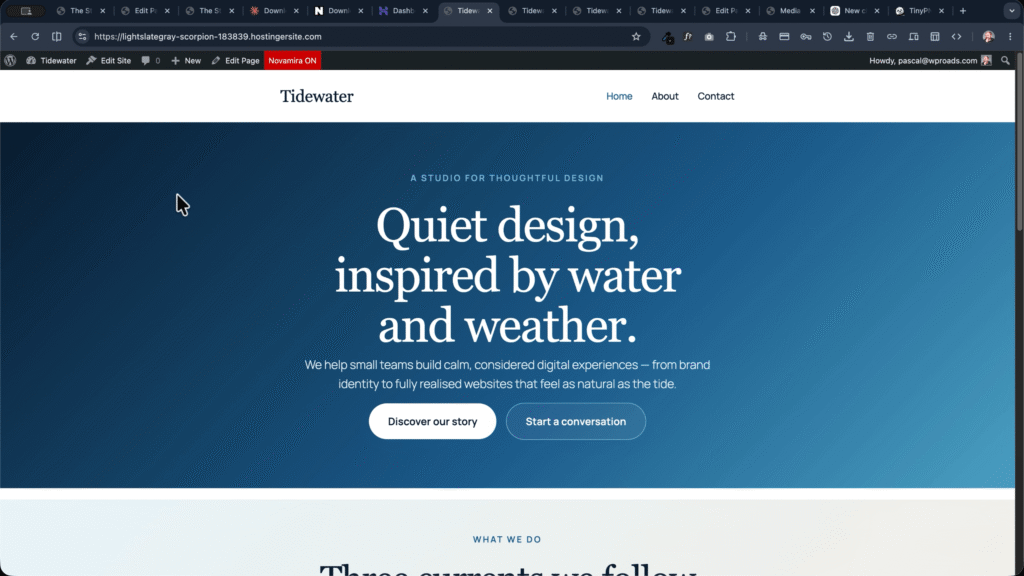

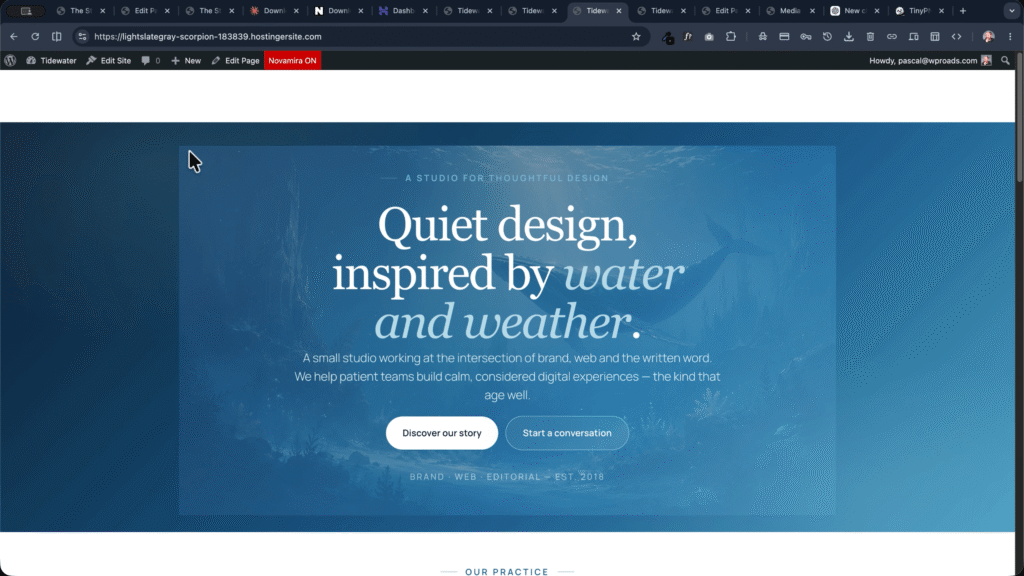

I asked it to make the design more professional, refine the layout, improve the visual hierarchy, and correct the issues. After a few iterations, the website started to look much more polished.
This is exactly what I like about vibe coding WordPress websites with AI.
You do not need to get the perfect result from the first prompt. You can treat the AI as a design and development assistant. You give direction, review the output, ask for refinements, and keep improving the website until it feels right.
The Final Design Looked Surprisingly Professional
After around 15 minutes of work, the website had a much more professional look.

The header had a beautiful glass-style background effect. The sections were better organized. The page felt more premium, more intentional, and much closer to something you could use as a serious starting point for a real project.
Even better, everything remained editable in the WordPress Site Editor.
I could open the page, change block settings, adjust section width, edit content, modify backgrounds, and continue working normally inside WordPress.
This is the main reason why I find this Claude WordPress website workflow so exciting.
The AI is not just generating something that looks good in a closed system. It is helping create a WordPress-native result that you can still manage, edit, and improve with the tools already available in WordPress.
And because the workflow is based on standard Gutenberg blocks, it can be especially interesting for people who want to build modern WordPress websites without relying too much on heavy page builders.
Novamira Free vs Novamira Pro
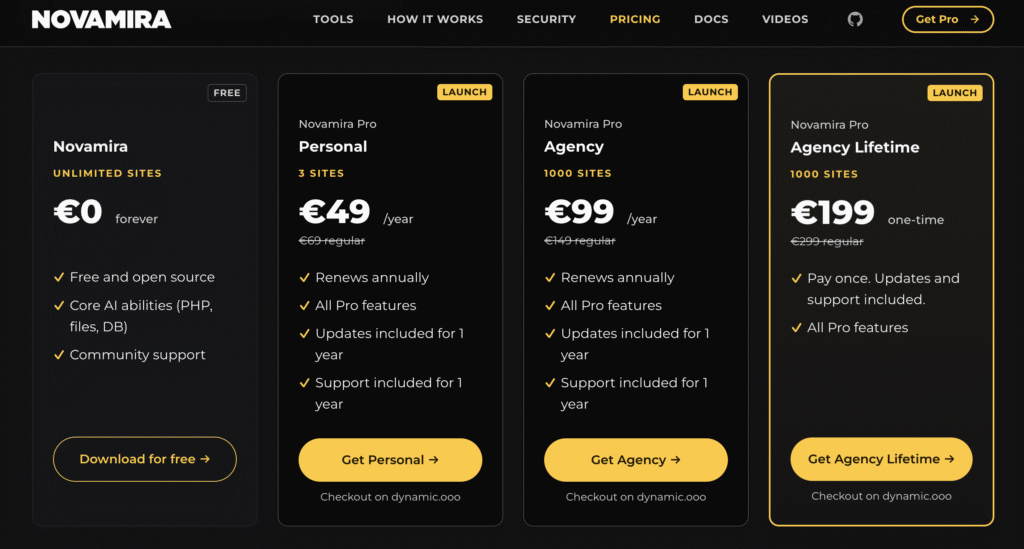
In the video, I used the free version of Novamira, and it was already powerful enough to build a complete website with Claude and the free WordPress editor.
However, Novamira also has a Pro version for users who want to take this workflow further.
The Pro version adds more advanced tools, including memory between sessions and guided skills for more complex WordPress tasks.
This can make a big difference.
For example, when I created a second website with a completely different design style, some of the same issues I had already corrected in the first project appeared again. With memory, the AI can better retain previous instructions and avoid repeating the same mistakes across sessions.
Novamira Pro is also designed to work better with tools like:
- Elementor
- Bricks
- Divi
- Oxygen
- WooCommerce
- ACF
- JetEngine
- Other popular WordPress plugins and builders
So the free version is very interesting if you want to experiment with AI agents for WordPress and the Site Editor.
The Pro version becomes more interesting if you want to build a more serious AI-assisted workflow for client websites, advanced plugins, or recurring WordPress tasks.
You can find more tools I personally use and test on my WP Roads tools page.
Important Security Notes
This kind of workflow is powerful, but it also requires common sense.
When you connect an AI agent to WordPress, you are giving it the ability to perform actions inside your website. Depending on the configuration, this can include sensitive operations.
That is why I strongly recommend using Novamira on staging, development, or temporary websites only.
A safe workflow would be:
- Create the website on a staging or temporary domain
- Keep backups
- Use the AI agent to build and refine the site
- Review the final result manually
- Move the website to the final domain when ready
- Disable or uninstall Novamira before handing the site to a client
Also, be careful with application passwords. The setup process may include credentials inside the prompt you give to the AI client, so you should treat that information seriously.
This is not something I would casually enable on a live production website without understanding the risks.
For staging and development, however, this workflow opens some very exciting possibilities.
Is This the Future of Building WordPress Websites?
I really think this is one of the directions WordPress website creation is going.
We are moving from “AI generates content for WordPress” to “AI helps manage and build inside WordPress.”
That is a big difference.
With tools like Novamira, Claude Desktop, MCP WordPress workflows, and WordPress AI agents, we can start imagining a future where AI helps us:
- Create page structures
- Build layouts
- Refine design systems
- Generate copy
- Configure plugins
- Create templates
- Improve Gutenberg websites
- Work faster with the Site Editor
- Prototype client websites in minutes
This does not mean that AI replaces the WordPress professional.
Actually, I think the opposite.
The better you understand WordPress, design, structure, SEO, performance, and client workflows, the better your AI results will be.
AI can move fast, but you still need direction. You still need taste. You still need strategy. You still need to understand what makes a website useful, clear, fast, and professional.
This is why I see Novamira AI WordPress workflows as a serious opportunity for freelancers, agencies, creators, and WordPress professionals who want to build faster without giving up control.
If you are interested in how WordPress itself is evolving toward AI and automation, you may also like my article about WordPress 6.9 new features, especially the parts about the Abilities API and future AI integrations.
Who Should Try This Workflow?
This Novamira tutorial is especially interesting if you are:
- A WordPress freelancer
- A website creator
- A small agency owner
- A content creator building websites
- A developer exploring AI agents
- A Gutenberg and Site Editor user
- Someone interested in vibe coding WordPress websites
- Someone who wants to create websites with Claude
It is also useful if you are trying to move beyond classic drag-and-drop workflows and explore what AI-assisted WordPress development may look like in the near future.
If you prefer Elementor, you can still explore AI-assisted workflows there too. Novamira Pro is designed to work with Elementor and other builders, and you can combine this kind of AI workflow with more traditional tutorials like my Elementor landing page tutorial.
But what makes this specific test exciting is that the final website was created with the free WordPress editor.
That means anyone with a clean WordPress installation can start experimenting.
Final Thoughts
Novamira AI and Claude open up a very exciting way to build WordPress websites.
In this test, I was able to create complete website designs using Claude Desktop, Novamira, and the free WordPress Site Editor. The result was not perfect on the first try, but with a few prompts and refinements, it became surprisingly polished and completely editable inside WordPress.
For me, this is the real power of this workflow.
It is not just about asking AI to generate a website.
It is about using AI as a WordPress agent that can help you build, refine, and improve your website directly inside the tools you already use.
If you want to build WordPress websites with AI, experiment with Claude WordPress workflows, or understand how MCP WordPress plugins and AI agents may change the future of website creation, Novamira is definitely a tool to watch.
And if you try this workflow, my advice is simple: start on a staging website, keep your prompt clear, guide the AI with specific rules, and treat the first result as a draft.
The magic happens when you refine it.
That is where vibe coding inside WordPress starts to feel really powerful.